Design and Display
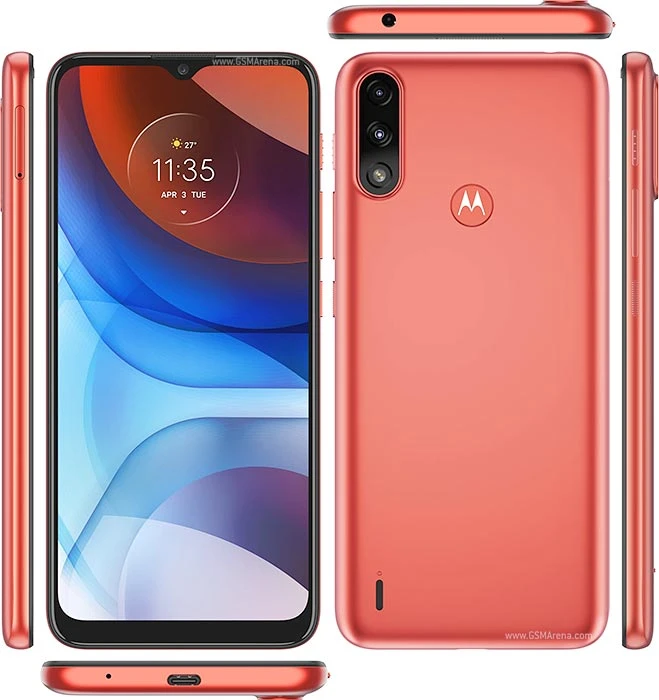
Moto E7 Power features a 6.5-inch Max Vision display based on IPS technology. The phone sports an HD+ resolution of 720 x 1600 pixels. That results in a pixel density of 269 PPI and an aspect ratio of 20:9. The phone has a waterdrop notch on the front and has noticeable bezels around the screen.
Moto E7 Power has a plastic body and weighs around 200 grams. One of the highlights of the phone is that it features an IP52 certification against water and dust.
Performance and Software
Under the hood, the device packs MediaTek’s Helio G25 chipset. It’s a budget gaming chipset from the company that we have previously seen in devices like Redmi 9A. As with other Motorola devices, this one too comes with a near-stock version of Android 10. As a result, unlike other budget devices, you won’t be receiving any ads and bloatware. But since Android 11 has been out for so long, we wished it ran the latest Android skin out-of-the-box.
The base variant of the phone comes with 2GB of RAM and 32GB of internal storage. However, it is also available in a 4/64GB configuration although that variant isn’t available in Nepal just yet. You can expand the storage up to 1TB using an external microSD card slot. In doing so, you will have to sacrifice dual-SIM functionality for that as the SIM slot here is a hybrid one.
Camera
The phone features a pill-shaped camera bump that houses the dual-camera setup and the LED flash. The primary camera makes use of a 13MP sensor and has an f/2.0 aperture. There is also support for phase detection autofocus. It is accompanied by a 2MP macro sensor. The absence of a dedicated depth sensor means the phone relies on software for the bokeh effect in the portrait mode. Other camera features include panorama and HDR mode.
On the front, there is a 5MP front-facing camera with AI face beautification. Both rear and front-facing cameras can record FHD videos at 30fps.
Rest of the specs
Moto E7 Power is fueled by a massive 5,000mAh battery. You also get support for 10W charging via the Type-C port. At the back, there’s a physical fingerprint scanner with “Moto” branding integrated on it. There is a Google Assistant button placed alongside the power button and volume rockers on the right side of the device.
- Display: 6.5-inches IPS LCD panel, 269PPI
- Resolution: HD+ (1600 x 720 pixels), 20:9 aspect ratio
- Chipset: Mediatek Helio G25 (12nm)
- Memory: 2/4GB RAM, 32/64GB storage (expandable up to 1TB)
- Software & UI: Android 10
- Rear Camera: Dual-camera;
– 13MP primary sensor with f/2.0 aperture, PDAF
– 2MP macro sensor with f/2.4 aperture
– LED flash
- Front Camera: 5MP sensor with f/2.2 aperture
- Security: Physical fingerprint sensor (rear-mounted)
- Audio: 3.5mm headphone jack, loudspeaker
- Connectivity: Hybrid Dual-SIM (Nano), WiFi 802.11 b/g/n, Bluetooth 5.0, GPS / AGPS / Glonass / Galileo / LTEPP / SUPL
- Sensors: Accelerometer, Proximity, Ambient Light
- Battery: 5000mAh with 10W charging
 english